In the US app stores for free! Coming soon to UK, Canada and Australia





Instructions and features of the MASTHAVE app
Setting up the app
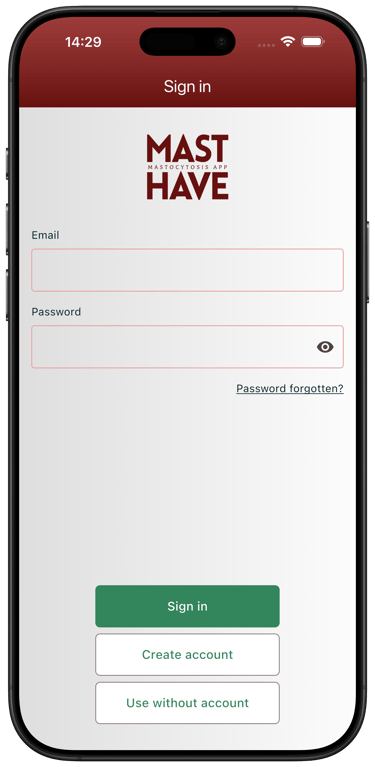
Using the app with an account
To prevent data loss, we recommend using the app after registering an account.
Your login details will be stored separately from other data and encrypted.
If you are participating in a clinical trial, you must register an account.
Log in
Please use a current email address and do not share your password.
If you have lost or forgotten your password, please use the "Forgot password" function.
Using the app without an account
Of course, you can use MASTHAVE without registering an account. In this case, your data will be stored anonymously on our server. Your previously entered data can be displayed on your device using a token.
If you change devices or lose your device, the data cannot be reassigned to your profile and will be lost to you.
We therefore recommend using the app with a registered account.
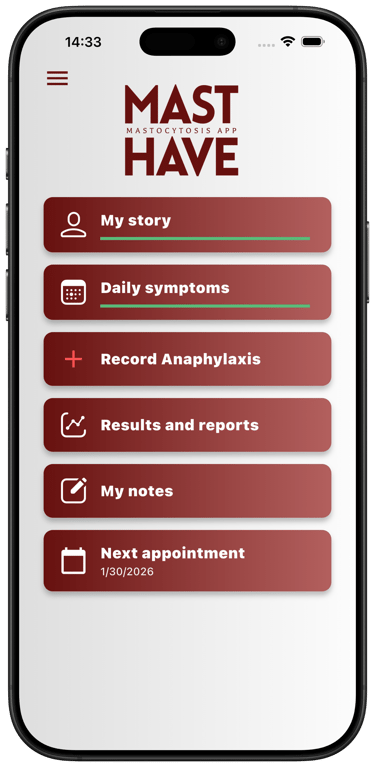
Buttons in the main menu
How can I add or correct entries later?
Your information can be changed at any time, e.g., if there are changes to your medication or current test results. To do this, tap on "My Profile," find the relevant section, and tap on "Edit." After changing the data, please remember to save your entries.
Why is this questionnaire important?
It helps your treatment team to understand your initial situation precisely.
On this basis, your further input can be better classified.
Tips for filling in the form
Please use a current email address and do not share your password.
✅ If you do not have certain information to hand (e.g. test results), you can add it later at any time. This information is requested once in the ‘My Profile’ section and can be edited there at any time.
My Story
When you start the app for the first time, a questionnaire will automatically open in "My Profile." This questionnaire is used to collect important basic information.
This section includes:
General information about you (e.g., age, gender)
Current medication, emergency medication, previous medication
Symptoms you experience
Anaphylaxis (severe allergic reactions)
Triggers (factors that can cause symptoms, e.g., food, medication, environmental factors)
Mastocytosis-specific test results (e.g., lab values, findings)
Other conditions you have
Socioeconomic stress
This data will be integrated into your PDF report, which you can easily share with your treating physicians.
Every six months, you will be reminded to update your data so that your profile is always up to date.
Daily documentation – your diary
In this section, you can record your symptoms, monitor your mastocytosis and note any effects on your quality of life. When you use the app for the first time, you will be presented with all three questionnaires contained in this section. These are linguistically validated PROMs (Patient Reported Outcome Measures), which are used as standard to monitor the treatment of mastocytosis.
Every day, you can record your symptoms from the last 24 hours and the medication you have taken in the activity score. This daily documentation helps to identify patterns and adjust treatment accordingly.
In addition to the daily activity score (MAS), every 4 weeks you have the opportunity to answer questions about disease control (Mastocytosis Control Test - MCT) and quality of life (Mastocytosis Quality of Life - MCQoL).
You can find a graphical summary of the results under ‘Results and Report’.
Tips for filling out the questionnaire
💊 In order to select your daily medication in the questionnaires, it must first be entered under ‘My Profile’.
🕒 You can also set a time at which you will be reminded to enter your information via the ‘Reminders’ menu item.
✅ Please note that the score required for the medical assessment of disease activity – known as MAS7 – requires continuous and, as far as possible, complete recording over a period of at least 7 days.
Record Anaphylaxis
In the main menu, you will find the ‘Report anaphylaxis’ button.
Here you can record and document an anaphylactic reaction.
To do this, select the appropriate triggers and reactions from a predefined list (e.g. food, environmental factors) and, if applicable, your emergency medication.
Your details will be saved and can be viewed later in the report.
Tips for filling in the form
💊 In order to select your emergency medication in the ‘Anaphylaxis’ menu item, it must first be entered under ‘My profile’.
Please call the emergency number 112 immediately if you experience life-threatening symptoms.
Results and Report
In the main menu, you will find the ‘Results and Report’ button. The data you have carefully entered is presented here in graphical form. This allows you to easily track the progression of your disease and identify changes in disease activity, e.g. due to a change in medication or lifestyle.
The activity score is displayed by default over a period of 7 days. It contains the main symptoms of your mastocytosis, supplemented by the medication you are taking. This can help you to identify changes in your symptoms depending on the medication you are taking.
You can set a different time interval individually using the three dots in the top right-hand corner. You can navigate through past periods using the arrows to the left and right of the graph.
The control test and quality of life displays always contain the evaluations for the last 6 months.
At the bottom of the page, you have the option of sharing your data as an automatically generated report.
📲 By code: Your doctor can access the report directly on their practice computer using a code. A scannable QR code can be generated on the website www.masthave-app.com/report. You must scan this code with your app to release the report.
📄 As a PDF: You can save the report as a PDF and send it.
Important note
The report can also be used as a personal data backup.
This means you always have your most important information backed up – regardless of your device.
Next appointment
In the main menu, you will find the ‘Next appointment’ button. When you enter your next appointment at your treatment centre, you will receive the relevant questionnaires in good time to prepare for the appointment, as well as daily reminders to complete the documentation. This will help you during your consultation with your doctors.
Enter appointment
Main menu -> Next appointment
Select date -> A date field will open. Select the agreed appointment and confirm with ‘OK’. Your selected appointment will be displayed. Confirm the appointment with ‘Save’.
Your appointment is now recorded and you will receive an overview of the date from which the relevant questionnaires will be provided and the status of your appointment preparation.
Change appointment
To change an appointment, please delete the previously entered appointment and enter the changed appointment as described above.
Notifications and reminders
You will receive notifications if you have not yet recorded any data on a given day.
The notification function cannot be turned off, but you can set the time of the notification.
Tap ‘Notification at 09:00’ or ‘Reminder at 20:00’.
Change the time on the display and confirm with ‘OK’.
Menu (three lines icon in the top left corner)
The menu in the top left corner gives you access to other pages and settings in the app.
Menu contents
About this app
Here you will find a brief description of the app, its objectives and instructions for use.
Mastocytosis info
In the ‘Mastocytosis info’ section, you will soon find helpful information about the disease.
The content is specially prepared for patients and explained in understandable language.
Account
If you have created an account, you can view your email address here.
You can create an account if you have previously used the app without one.
You can log out or delete your account.
Studies
Here you can enter the study ID you received from your treatment team.
If you have multiple study IDs (e.g. for different projects), you can also manage them here.
Reminders
Here you can set whether and when you would like to be reminded daily to complete your documentation.
The default setting is 9:00 a.m.
Please note: Reminders before your next doctor's appointment cannot be turned off, only adjusted in terms of time.
Privacy policy
Contains all information about how your data is processed and protected.
You can view this at any time.
Terms and conditions (T&Cs)
Contains the legal framework for using the app.
MASTHAVE® App
For patients with mastocytosis
info@masthave-app.com
© 2026. All rights reserved.